|

Establish Your Mission
Every site needs a basic purpose--a mission that will drive your
team, focus your site, and eventually attract your users. Articulating
your mission is a significant task and one that can seem overwhelming,
but you can kick off a productive brainstorming session by answering
a few simple questions.
- Why are you here?
- What do you want to accomplish with this site?
- What do you want your users to accomplish with this site?
- What will keep a user on your site?
- What will encourage a user to return?
(ie. Regularly updated content, news, daily photos, and tips>,
active message boards, reviews of products, and interviews,
community. Free email, downloadable wallpaper, ePostcards.)
Each question should spark a dozen more specific inquiries. Write
all of the questions and answers on a white board in your workspace.
Encourage your team (or even a group of helpful friends) to connect
ideas ( for example, "foster a productive community") with specific
actions ("create a community message board"). When answers involve
designing another page, working with a new technology, or adding
any content to your Web site, place that action into one of three
categories: must have, would like, and can sacrifice. Later, these
priorities will be necessary if limited resources or time constraints
force compromises.
The site's mission will inspire the rest of the conceptualization
process. It also gives the team a list of priorities that will
enable constructive debates during the creation of the final site
specifications.
Identify Your Viewer
Take the time to better understand your target audience. Your
site may appeal to a large audience or a very specific segment.
Once you have identified your viewer, you may find this will help
determine how to organize your site content.
Create Mock-ups
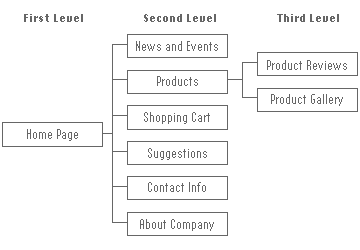
Mock-ups begin with the hierarchy. Our sample hierarchy below
grew from the first exercise: brainstorming a mission. Labeled
"must-have," sections for news, products, photos, message boards,
and tips are present in the top-level navigation. Working from
the front page down, the team establishes how a visitor can drill
through the site, skip from section to section, and how to perform
specific actions.
Here's our sample hierarchy:
Menu Bar (on the left side of each page)
- Logo (Home Page)
- News and Events
- Products >> Reviews, Gallery
- Shopping Cart
- Suggestions
- Contact Info
- About Our Comapny
Here is a brief overview of our first two sections...
Pages
- 0.0 Home Page
The home page will have a left-side nav bar, and clicking
any navigation links will bring content up in a large right-side
table.
- 1.0 News and Events
The News section will have current news, specials and upcoming
events.
- 2.0 Products
The Products section has headlines announcing upcoming events,
the results of recent competitions, developments in the community,
new product releases, and features on industry personalities.
Product Reviews: links to new product reviews with blurbs
about each product (link back to product photo from Gallery
for each)
Product Gallery: a searchable database of product descriptions,
photos and diagrams.
Once you've fleshed out your tentative hierarchy, BadCat Design
can start creating simple visual mock-ups.
From the sketches, we can build HTML wireframes, which are a basic
prototype of your Web page with space holders for content, navigation,
and graphics. We keep three basic questions in mind as we organize
your hierarchy and design your mock-ups:
- How do I know where I am?
- How do I know where I am likely to go or should go next?
- How do I know how to get back to where I was?
The Initial Test...
Gather a focus group, and show them the HTML mock-ups. Conduct
interviews, with questions covering everything from your prospective
color scheme to navigation and content focus. Provide sample content
and ask for reactions to the tone, content, and length. Create
tasks for the focus group to complete that mirror real-world behavior.
Here is a sample tasks list that the viewer might try to accomplish:
- From the home page, go to the Suggestions page.
- From the Suggestions page, post a suggestion and then return
to the home page.
- From the home page, find the review for the new "product".
- From the review section, purchase the new product, then return
to the products section.
Pay close attention to suggestions and questions. Note where,
when, and how often you hear comments such as "Why is this here?"
and "But how do I get there," or "I should be able to just get
there from here, and not go through this." Query your focus group
to determine possible solutions. Gather all of this information,
and then return to the mock-ups. It's now time to revise.
Revisions
A word about specifications...
Most large Web sites create a specification document that details,
in writing, how the site will function, down to the very last
click. A spec is a comprehensive articulation of a conceptualized
site and requires the input and sign-off from team leaders and
decision makers before it's implemented. Small businesses can
also benefit from writing a specification. It's a definite way
to assure everyone is on the same page.
A specification should include the final hierarchy, the organization
of the content, and all of the technology used for actions involving
databases or transactions of any kind. It is a detailed blueprint
of your site, and anyone who reads it should have a perfect understanding
of the planned site.
|

Define - Design - Deliver
We follow a three-phase approach for print, Web and interactive
development. This approach is customized based on the type of
project that we are producing.
Phase 1: Define
- Determine the project objectives.
- Define the audience.
- Understand the competitive situation.
- Determine the budget and time frame.
- Determine functionality and content.
- Deliver a Project Definition Proposal.
Phase 2: Design
- Determine how the content will be organized.
- Determine what media will be used.
- Collect existing content.
- Design the look and feel for the project.
- Design concept templates.
Phase 3: Deliver
- Publish the site or project on the WWW
- Maintain web site with regular updates.
- Deliver final product to the client.
Please e-mail
us directly if you have a question regarding any of the above process
descriptions or have a specific need for an upcoming project.
|




